 how-to
Does a Dull Blade Increase Granulator Energy?
Last Updated: October 25, 2026
Quick Summary
Yes, dull blade granulator energy consumption increases because worn edges force the motor to crush and tear material instead of cutting cleanly, raising current draw and power demand. Sharp blades minimize resistance and keep energy use normal, while dull blades create the resistance that becomes heat and wasted energy.
- Dull blades crush material instead of cutting cleanly, significantly raising motor power draw and current consumption.
- Energy consumption should be measured as kilowatt-hours per kilogram (kWh/kg) of processed material, not just current draw alone.
- Blade wear signs include dull discolored edges, slower throughput, inconsistent particle sizes, increased dust, and louder grinding sounds.
- Incorrect clearance, screen blockage, material changes, and feed rate issues can mimic dull blade symptoms and must be ruled out first.
- Correcting blade clearance to specification often reduces energy use by 10-15% without replacing blades.
Table of Contents
- How Dull Blades Increase Granulator Energy Demand
- Recognizing Granulator Blade Wear Signs
- Measuring Energy Consumption to Diagnose Blade Wear
- Granulator Blade Sharpening vs. Replacement
- Granulator Troubleshooting: Energy Spikes and Performance Loss
- Granulator Blade Clearance Adjustment and Maintenance
- Getting Your Blades Sharpened or Replaced
- Frequently Asked Questions
How Dull Blades Increase Granulator Energy Demand
A dull blade granulator energy problem arises because the worn edge forces the motor to work harder, raising current draw and strain.
Sharp blades slice cleanly through plastic, rubber, or other materials; dull blades crush and tear instead.
Sharp rotor and stationary blades cut cleanly in sync.
Motor load reflects blade sharpness: a worn blade creates resistance, resistance becomes heat, and heat means wasted energy.
Recognizing Granulator Blade Wear Signs
Your granulator blades show clear wear signals before they fail.
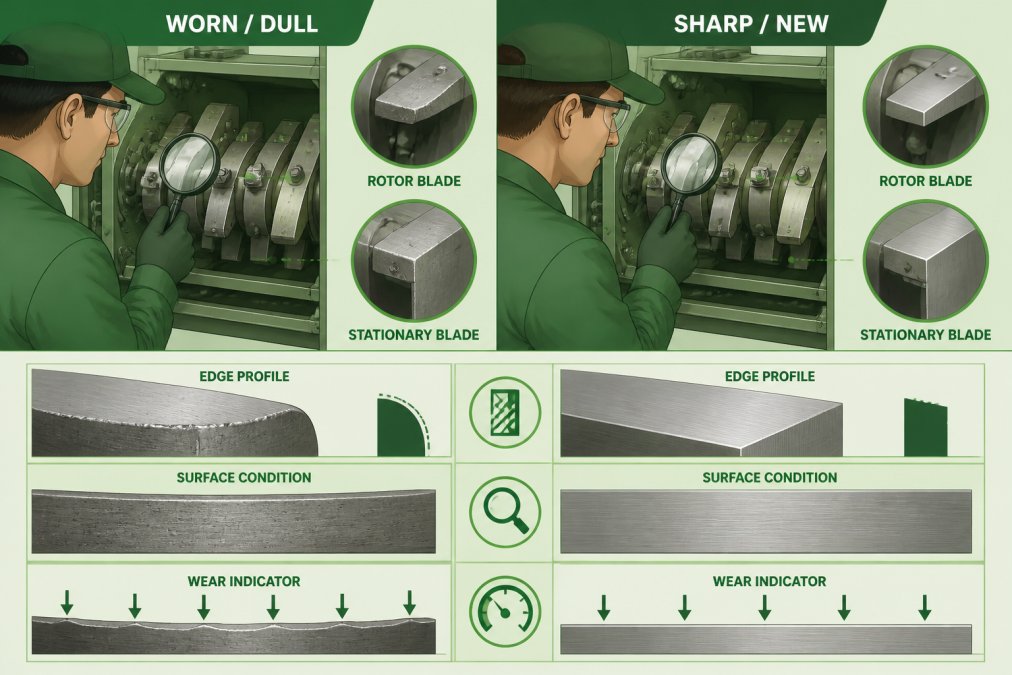
Visual inspection reveals wear patterns:
- Dull, discolored cutting edges instead of bright, reflective surfaces
- Small chips or nicks along the blade edge
- Uneven wear across the blade length
Performance changes signal blade deterioration:
- Slower throughput for the same motor speed
- Inconsistent particle sizes in your regrind
- Increased dust and fines during processing
Sharp blades cut uniformly; dull blades produce inconsistent fragments, more dust, more oversized pieces, and more regrind needing reprocessing.
Sharp blades run at a consistent pitch; dulling blades bring grinding, squealing, or a labored tone, cues that often arrive before other problems.
For more on extending blade life and preventing wear, review our guide to extending granulator blade life.
Measuring Energy Consumption to Diagnose Blade Wear
"Current draw goes up" is a symptom, not a diagnosis. To prove blade wear drives your energy costs, you need a repeatable procedure producing kilowatt-hours per kilogram (kWh/kg) of processed material, not just an amp reading.
Why current draw alone is misleading
Motor current responds to total load, not just cutting force: feed rate, bulk density, screen size, rotor speed, and ambient temperature all move the needle. A granulator at 42 amps on a light feed can use less energy per pound than one at 38 amps on a heavy feed. The only comparable metric is energy per unit of output, kWh divided by kilograms (or pounds) of regrind.
Step-by-step energy audit
Run this on a stable production day, with the same material, screen, and feed rate for baseline and follow-up.
- Lock out and verify safety. Follow lockout/tagout before opening any enclosure. Confirm the meter is rated for the motor's voltage and current. Never open a live cabinet.
- Install a logging meter. A clamp-on power meter with data logging on the motor feeder suffices. Record true RMS current, voltage, and power factor so it calculates real power in kW. Log at one-minute intervals.
- Establish a weighed baseline. Feed a known mass, for example, 500 lb of the same resin, regrind ratio, and moisture condition, through the granulator. Record start and end time and total kWh. Calculate kWh/kg (1 kg = 2.2046 lb).
- Record operating parameters. Note rotor speed, screen size, feed rate setting, and blade clearance. Any change in these invalidates the comparison.
- Repeat three times. Run the baseline on three separate days to capture normal variation, often ±5% day-to-day scatter on the same equipment and material.
- Sharpen or replace blades, then re-test. After service, reset clearance to specification and repeat the identical weighed run. Compare kWh/kg before and after.
Interpreting the numbers
If post-service kWh/kg drops by more than the scatter from step 5, blade condition was a real contributor. If within scatter, blades weren't the main driver, look elsewhere. Your own baseline variation is the only honest benchmark.
Distinguishing blade wear from other causes
Before blaming blades, rule out these confounders:
- Incorrect clearance: Too little causes blade contact and friction; too much lets material slip and recirculate. Both raise kWh/kg without a dull edge.
- Overloaded feed: Feeding faster than the rotor can clear raises load. Confirm feed rate and feeder amperage are unchanged.
- Screen blockage or wrong screen: A blinded screen forces recirculation and extra size reduction. Inspect and clean it before testing.
Practical sequence: verify material and feed, clean the screen, check clearance, then measure. Only then should blade sharpness be the primary suspect.
Measurement caveats
- Current draw is not energy per unit of output, always pair amps with a weighed throughput figure.
- Power factor and voltage drift affect kW readings; use a meter that logs real power, not a simple amp clamp, for defensible numbers.
- Short runs exaggerate startup transients. Use runs long enough that steady-state operation dominates the log.
For more on extending blade life and preventing wear, review our guide to extending granulator blade life.
Granulator Blade Sharpening vs. Replacement
Deciding between sharpening and replacement depends on blade condition, cost, and downtime tolerance.
Sharpening works best when:
- Blades show wear but no structural damage
- The cutting edge is dull but the blade body is intact
- You want to minimize downtime and cost
Precision sharpening removes a thin layer of metal to expose a fresh edge.
Replacement is necessary when:
- Blades are chipped, cracked, or structurally damaged
- The blade body is too thin for safe sharpening
- Multiple blades need service simultaneously
Review our granulator blade options and replacement products to explore available solutions for your equipment.
Many operations use a mix of both.
Our industrial blade maintenance checklist helps you decide which approach fits your operation.
Granulator Troubleshooting: Energy Spikes and Performance Loss
When dull blade granulator energy use climbs, blade condition is the most common cause, but treating it as the only cause wastes money on unnecessary sharpening and leaves real faults undiagnosed. This decision sequence separates blade wear from clearance errors, feed problems, screen issues, and mechanical faults, and shows how to weigh service cost against recovered energy and throughput.
Diagnostic decision sequence
Work through these checks in order, ruling out each cause before spending money on blades.
- Confirm the material and feed are unchanged. Compare resin type, regrind ratio, moisture, and feed rate setting to your baseline. A material switch alone can raise kWh/kg by a noticeable margin. If material changed, re-baseline before blaming blades.
- Inspect and clean the screen. A blinded or wrong-size screen forces recirculation and extra size reduction. Clean it, verify hole size, and re-measure.
- Check blade clearance. Measure the gap between rotor and stationary blades across the full length. Out-of-spec or uneven clearance mimics dull blades: too little causes contact friction, too much lets material slip and recirculate. Correct clearance before sharpening.
- Inspect blade edges. Look for dull, discolored, chipped, or uneven edges. If edges are bright and uniform, blades are unlikely to be the primary driver.
- Listen and feel for mechanical faults. New grinding, squealing, or labored tones, plus elevated bearing temperature, point to bearings or motor issues rather than cutting force.
- Re-measure kWh/kg. Only after steps 1-5 are cleared should you attribute the energy rise to blade wear.
Symptom-to-cause map
| Symptom | Most likely cause | First check |
|---|---|---|
| Gradual kWh/kg rise over weeks | Progressive blade wear | Blade edge condition |
| Step change in current draw | Material change, screen blockage, or feed change | Feed rate and screen |
| Loud grinding or squealing | Bearing or blade contact | Clearance and bearing temperature |
| Inconsistent particle size with normal current | Clearance or screen | Clearance measurement |
| High current with poor throughput | Dull blades or overloaded feed | Weighed throughput test |
Cost and payback framing
Energy savings alone rarely justify a service call; recovered throughput and reduced fines usually do. To decide, compare:
- Service cost: sharpening or replacement plus downtime.
- Energy savings: the kWh/kg reduction multiplied by your annual throughput and your electricity rate in USD per kWh.
- Throughput recovery: the extra pounds per hour you regain, valued at your production margin.
A common pattern is that throughput recovery and fines reduction outweigh the direct electricity savings. Use your own measured kWh/kg delta and throughput figures rather than assumed percentages.
Documenting the diagnosis
Record energy readings, blade condition, clearance, screen condition, material lot, and feed rate for every event. Over time this log reveals whether energy rises track blade wear or another recurring fault, and gives you defensible data for maintenance budgeting.
Granulator Blade Clearance Adjustment and Maintenance
Blade clearance, the gap between rotor and stationary blades, directly affects energy efficiency and cut quality.
Correct clearance specifications:
- Typically 0.005" to 0.015" depending on blade type and granulator model
- Check your equipment manual for exact specifications
- Clearance should be uniform across the full blade length
Too much clearance lets material slip through without clean cuts; too little causes blade contact, friction, and heat.
Adjust clearance when you install new blades or after sharpening.
Maintenance prevents clearance drift:
- Inspect clearance monthly on high-use equipment
- Check for blade movement or loosening
- Verify that mounting bolts remain tight
Loose blades shift during operation, changing clearance unpredictably.
When clearance drifts out of spec, energy consumption climbs. Particles don't cut cleanly.
Getting Your Blades Sharpened or Replaced
Choosing a sharpening provider affects cost and downtime, poorly sharpened blades perform worse than dull originals.
Evaluate sharpening providers by:
- Precision of the sharpening process and adherence to specifications
- Turnaround time and availability for your schedule
- Experience with your specific blade types and granulator models
A quality sharpening service measures clearance, inspects for damage, and sharpens to precise angles.
Turnaround time matters when your granulator is down. Know your options before you need emergency sharpening.
Review the industrial blade sharpening quality standards to understand what proper sharpening looks like and how to verify quality.
Replacement blades should come from suppliers who understand your equipment.
The Cutting Edge Grinding & Supply Co. handles both sharpening and replacement for granulator blades.
Frequently Asked Questions
Does a dull blade increase granulator energy consumption?
Yes. As granulator blades dull, the cutting edge loses its sharpness, forcing the motor to work harder to push material through. The rotor must exert greater cutting force to achieve the same size reduction, which directly increases current draw and power demand. Dull blades also generate excess heat and can reduce throughput, meaning the machine runs longer to process the same volume of plastic waste or regrind. Monitoring motor current and electricity use is the fastest way to detect blade wear before it becomes a production problem.
What are the signs that granulator blades are dull or damaged?
Watch for inconsistent particle size, increased dust or fines in the output, unusual noise or vibration, higher motor temperature, slower processing speed, and a noticeable rise in electricity consumption. If the granulator struggles to cut material that it previously processed easily, or if you see visible chipping or wear on the blade edges during inspection, sharpening or replacement is overdue. Heat generation during granulation is another red flag, dull blades create friction rather than clean cuts.
How often should granulator blades be sharpened?
Sharpening frequency depends on material type, volume processed, and blade quality. High-throughput operations may need sharpening every 4-8 weeks, while lower-volume shops might go 3-6 months. The best approach is to monitor energy consumption and cut quality rather than follow a fixed schedule. When you notice a measurable rise in motor current draw or see performance drop, that's your signal to sharpen. Precision sharpening extends blade life significantly compared to in-house attempts.
Can sharpening granulator blades reduce energy use?
Absolutely. A sharp blade cuts material cleanly with minimal resistance, so the motor draws less current and uses less electricity. After professional sharpening, most operations see reductions in power demand. Preventive maintenance through regular sharpening is far more cost-effective than running dull blades until they fail or require replacement.
Dull blades don't just reduce cut quality, they spike your energy bills and strain your equipment. Monitoring blade condition and addressing wear early prevents the costly downtime and excess power consumption that come with severe dulling. Whether you sharpen or replace depends on blade condition and your operation's needs. Either way, sharp blades keep your granulator running efficiently and your costs down.